
Article
The scanner display in ALTRON: a continuous image from a line scan camera
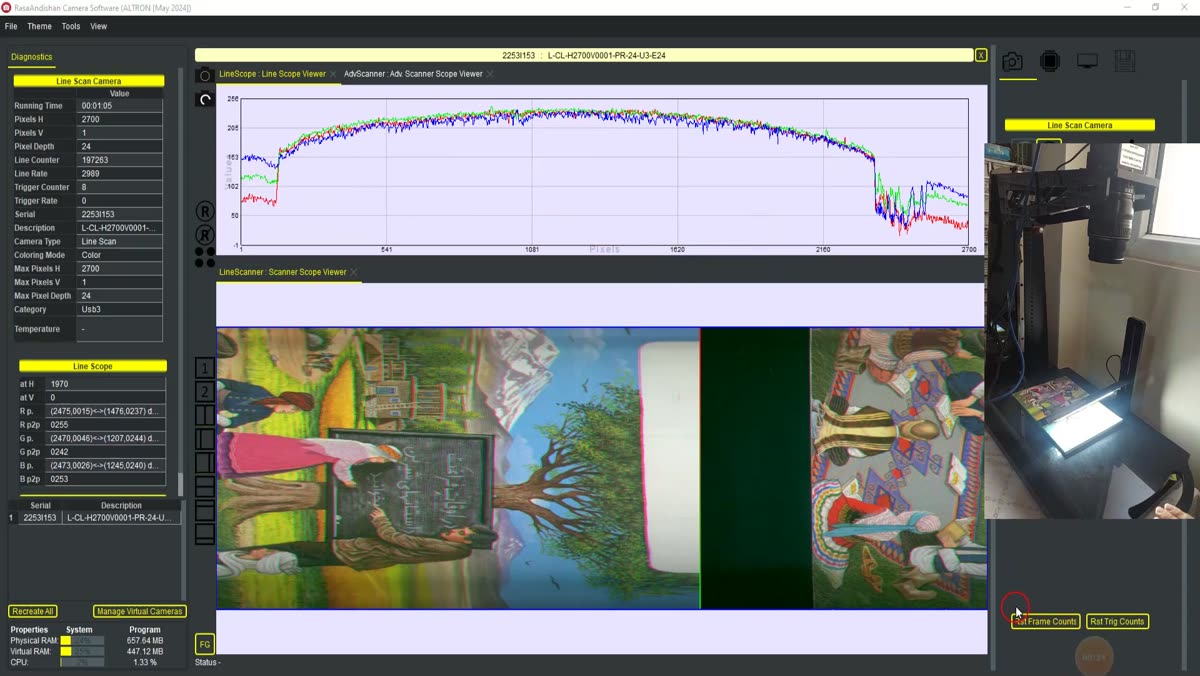
Someone new to line-scan cameras usually expects a picture the first time they press Start. But the sensor has only one row of pixels and delivers one line at each moment. The second dimension of the image is created by the object’s motion. The scanner display in ALTRON places the lines one after another, side by side, so you see a continuous image of the strip, fabric or sheet.
Which viewer do you have?
ALTRON has two scanner viewers for line-scan cameras. Both accept only lines:
The preset graph for the monochrome line-scan camera has no scanner viewer, only Line Scope. If you want a continuous image, add the Advanced Scanner Scope node in the graph editor and connect it to the data path.
The window width is how many lines are shown side by side. Enter it in the viewer settings, in the Width field, and press Set. The default is 32000 lines for Advanced Scanner Scope and 1000 lines for Scanner Scope.
In Advanced Scanner Scope, the horizontal axis is the line number and the vertical axis is the sensor pixel number. A colored marker line shows where the last line was written. With it you can tell where the fresh image is and which part belongs to the previous pass.
- Zoom with the mouse wheel.
- Right-click and drag to pan the view.
- Left-click and drag a box to enlarge that area. This is done by the Zoom on Area Selection option, which is on from the start.
- Double-click to return the view to its original state.
In Advanced Scanner Scope, the box you draw does not just change the view. Three camera panel fields are filled in as well:
If your camera is not on a pan-tilt head, the PTZ fields do nothing. But check the line crop once after every zoom.
If a circle looks like an ellipse on the image, the viewer is not at fault. The line rate does not match the object’s speed. If the image is stretched in the direction of motion, lower the line rate. If it is compressed, raise the line rate. We cover this setting in detail in the article on exposure and line rate.
- Keep the scanner viewer next to Line Scope. The continuous image shows the overall shape, and the line plot shows the exact brightness values.
- If you have placed an ImagingInterval node before Advanced Scanner Scope, only one out of every few columns lights up. The reason is that each line lands in the column with its own number. In the viewer settings, tick Place lines one after another so that the lines are arranged consecutively.
- A very large width compresses the image on screen. Zoom in to see details.
- The viewer is for viewing only. What is saved to disk is determined by the storage node, not by the window width.
You can find a more general explanation of line scan cameras in Wikipedia (English).
See our line scan cameras and their specifications on the line scan cameras page. If your scanned image behaves strangely, send us a sample through contact page.