
Article
ALTRON Lens Calculator: focal length and pixel size on the object
One of the costliest mistakes in machine vision projects is buying the lens first and doing the calculations afterwards. The camera gets installed, and only then does it turn out that either the full width of the conveyor does not fit in the frame, or each pixel on the object is so large that small defects are not visible at all. The ALTRON Lens Calculator is built for exactly this moment before purchase: it gives you the required focal length and the pixel size on the object before you order a lens.
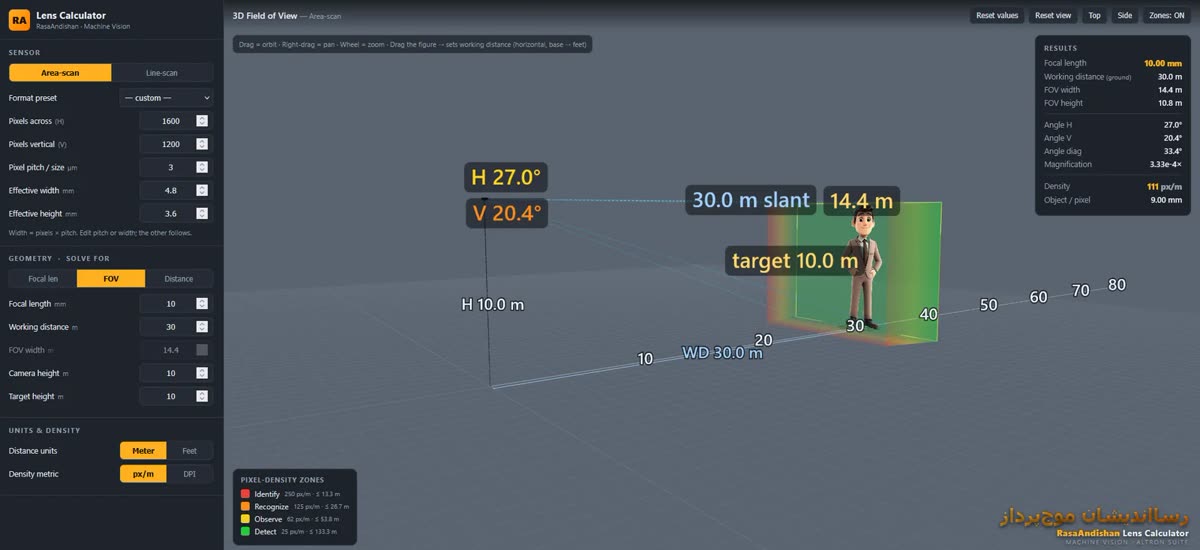
You open this tool from the Tools menu via the Lens Calculator... option. It is installed together with ALTRON and opens in the system's default browser. It solves the relationship between the sensor, the lens and the scene and shows the result in a live 3D view.
- What focal length do you need to cover a given width?
- With this lens at this distance, how much of the scene fits in the frame?
- How many millimeters does each pixel cover on the object?
The third question is the one that usually gets forgotten, and it matters more than the others, because it determines how small the smallest visible defect is.
- In the SENSOR section, select the sensor type: Area-scan or Line-scan. In line mode the sensor has only one row, and the results and the 3D view change accordingly.
- Enter the sensor specifications from the camera datasheet: Pixels across (number of horizontal pixels), Pixels vertical (number of vertical pixels) and Pixel pitch in micrometers. If your sensor size is not in Format preset, leave it on custom.
- Set the SOLVE FOR switch to Focal len. The field that is to be calculated becomes grayed out and non-editable.
- Enter the mounting distance in Working distance, and the width that must be seen in FOV width.
- Read the calculated focal length. Lenses on the market come in specific values, so choose the nearest available lens. Then switch SOLVE FOR to FOV and enter that lens's focal length to see the actual result.
- In the RESULTS table, check the Object / pixel value. Our rule of thumb is that every critical detail should span at least 3 to 5 pixels.
In Line-scan mode the Line-scan motion section is also active. In Object speed, enter the conveyor speed in meters per second. If you set Line rate to zero, the tool calculates the line rate at which the pixels on the object are square. In the results you see Line rate and Transport res. Transport res. is the size of each line in the direction of motion and is obtained by dividing the speed by the line rate. If this number differs from Object / pixel, the image will be stretched or compressed in the direction of motion. So before buying, check whether the camera can reach this line rate.
In this tool, Working distance is the horizontal distance along the ground, from the foot of the camera to the object. The two fields Camera height and Target height take the height of the camera and of the object. When the camera is mounted higher than the object, the actual optical distance is greater than the distance along the ground. You see this distance in the results under the name Optical range. Ignoring this difference is a common mistake. To see this effect, press the Side button in the 3D view.
- Drag to rotate the view, right-drag to pan, and use the mouse wheel to zoom. You can also drag the reference figure along the ground to change the working distance.
- Reset view only restores the viewing angle. Reset values, however, returns all inputs to their defaults and erases your work.
- In the Units & density section you can set the unit to meters or feet and the density to px/m or DPI. If your work is print or surface inspection, DPI is more familiar.
Do not settle for Format preset. The actual sensor size is obtained by multiplying the number of pixels by the pixel pitch. Enter the exact datasheet value so that Object / pixel is reliable. If you are still undecided between camera models, see the page camera comparison page puts the specifications you need for this calculation side by side.
If you'd like to read more about the theory behind focal length, this Wikipedia article (English) is a good start.
If you've worked out the final numbers for your project and want someone to double-check them, send us the details through the Contact us page.