
Article
Save Formats in ALTRON: BMP, JPEG, TIFF, Raw Data or Video?
One of the first questions people ask us after setting up a camera is: “In which Saving format: should we keep the images?” The short answer is that it depends on what you want to do with the file later. Choosing a format is not just a matter of taste. It directly affects disk usage, CPU load and measurement accuracy.
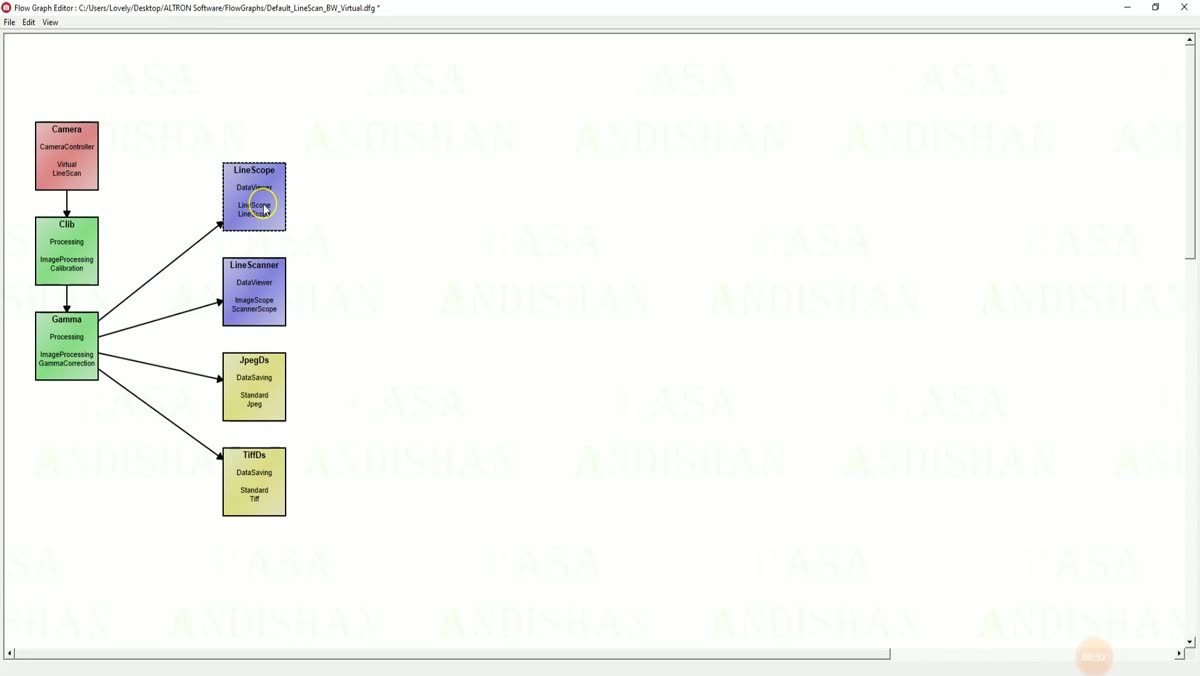
In ALTRON, saving is a node in the graph (the Data Saving family). To choose a format, place the saving node for that format in the graph. If needed, branch one output to several nodes at once; for example, one node saves the data raw while another displays it.
A lossless format keeps each pixel's value exactly as it came from the camera. A lossy format discards some detail to reduce size, and this change cannot be undone. So any data you will later measure or process must be saved losslessly.
TIFF Data Saving saves losslessly and also preserves high bit depth. Most image-analysis software can read it. That is why the TIFF node is already included in ALTRON's ready-made graphs.
In this node's panel, Compression has two modes: None and Deflate. With Deflate the image stays exactly the same, but the file becomes much smaller. This compression runs on all CPU cores. If your disk is slow, this option helps the disk keep up with the camera.
Raw Data Saving writes the camera's output bytes into one continuous file without any interpretation. This method is fully lossless and the fastest way to write. Its big advantage is that you can later play the same file back with the playback graph and change the processing settings on the original data.
With Format you choose between two modes:
If the recording is very long, or you want to reach part of it without reading the whole file, Separated Raw Data Saving writes each frame or segment to a separate file. This node also offers lossless compression. A higher level gives a smaller file but puts more load on the CPU. At high data rates, this may cause dropped frames.
Bitmap Data Saving writes each image as an uncompressed BMP. Nothing is lost and almost any software can open it. Its drawback is the large file size.
JPEG Data Saving uses lossy compression. You set the quality with Quality, and its default is 100. If you set it below 90, edges gradually become blocky. JPEG is a good choice for reports, previews or sending over a network, not for measurement.
A note for line-scan cameras: in the BMP, JPEG and TIFF nodes, the Scan Height option determines how many lines are stacked together to form one image.
For area-scan cameras there are several video saving nodes: H.264, H.265 and MPEG-4, which produce mp4 files, and an AVI node. Video compression greatly reduces size, and the file plays like an ordinary movie. Output FPS is the playback speed of the file and does not have to match the camera's actual rate. If you want real-time playback, set it equal to the camera's frame rate. Video is also lossy and is not suitable for measurement.
- Measurement, calibration, scientific analysis or long-term archiving: TIFF, with Deflate if the disk is slow.
- Reprocessing later with different settings: Raw Data Saving.
- Opening the data in spectral or GIS software: raw data in ENVI format.
- Reports and previews: high-quality JPEG.
- Showing to a colleague or customer: video.
Many people save data that will later be measured as JPEG. If you are not sure, save it raw. From a raw file you can produce any other output via playback, but you cannot get back to the raw data from the other outputs.
You can find a more general explanation of image file formats in Wikipedia (English).
All saving nodes share the same logic for path, recording limit and cache. Learn one and you know the rest. A more complete introduction to the software is in ALTRON page. If you are undecided between two formats for your project, contact us and we will look at it together.