
Article
IR-Cut Filter and Mechanical Lens Shutter in ALTRON
An image that had the right colors under daylight in the morning has turned slightly purple under the workshop lights in the evening. In a color camera, the first thing we check in this situation is IR-Cut filter of the lens. Alongside it, we also have the lens's mechanical shutter, which increases or decreases the incoming light without touching the camera. Both are in the Lens Control tab of the camera panel, on both line-scan and area-scan cameras.
Where is the Lens Control tab?
Select the camera node to open its settings panel. The tabs of this panel have icons. Hover the mouse over the icons to find the tab named Lens Control. A quicker way is to type IR Cut in the Ui Search box.
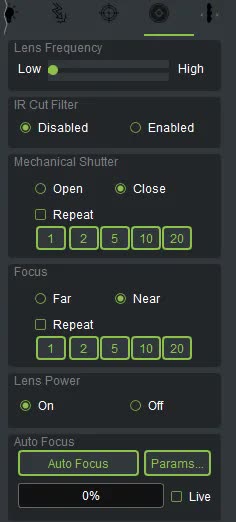
Silicon sensors are also sensitive to near-infrared light, but our eyes cannot see it. If this light reaches the sensor, the colors shift. The IR-Cut filter blocks it. In the IR Cut Filter section you have two modes:
Your selection is sent to the camera immediately. It is saved along with the other settings and reapplied at every Start.
- Because the default is Disabled, check this option first when you set up a color camera for color work. Many “colors are wrong” complaints are solved right here.
- After you change the filter mode, run white balance again. The light spectrum reaching the sensor has changed, so the old coefficients are no longer correct.
- A color correction matrix built with the filter on does not give correct results with the filter off.
The Mechanical Shutter section in the same tab closes or opens the light path of the motorized lens step by step. When the camera is mounted above the production line or on a mast, you no longer need to go to the lens to block the light. How it works:
- Choose a direction: Close to close or Open to open.
- Press one of the buttons 1, 2, 5, 10 or 20. The number on the button is the size of the movement. 1 is the smallest step and 20 the largest.
- If you check Repeat, the movement repeats for as long as you hold the button down. Releasing the button stops the movement. Without Repeat, each press sends only one movement.
One important use of the shutter is capturing a dark reference. Nobody needs to put a cap on the lens. Close the shutter completely, capture the reference, and then open the shutter. In Thermal camera too, uniformity correction starts with this same shutter closing. We have explained it in the article on NUC uniformity correction.
The shutter, focus and autofocus only move when Lens Power is On. If the buttons do nothing, look at the lens status label:
Another mistake we often see: the shutter was closed to capture a reference and then not opened again. If the image suddenly goes dark and the exposure has not changed, check the shutter first.
A short, general source on infrared cut-off filters: Wikipedia (English).
See our color cameras on the line scan cameras and area scan cameras see it. If you do not know which of these features your camera's lens has, ask us via contact page to send us your camera model.