
Article
Camera digital and relay outputs in ALTRON for signalling a PLC
On a production line, the camera does not work alone. A light has to switch on in sync with image capture. A buzzer has to alert the operator. Another device has to work to the camera’s rhythm. If all of these commands come from a separate I/O card, wiring and timing coordination become complicated. That is why our cameras have digital and relay outputs, and in ALTRON you configure them from the camera panel itself. You can connect these outputs to PLC inputs.
There are two types of output, and each has its own job:
Select the camera node to open its settings panel. The tabs in this panel have icons. If you hold the mouse over an icon, you see the tab’s name.
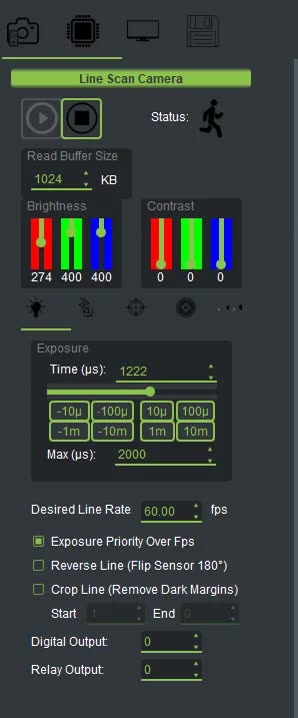
- On a USB line-scan camera, both fields are in the Exposure tab.
- On a USB area-scan camera, both fields are in the Second Exposure tab.
If you cannot find them, type Relay or Digital Output in the Ui Search box to jump straight to that field.
Each field takes a number. Its default is zero. This number is written to the camera’s output register and determines the state of the output lines.
- As soon as you change the number, the new value is sent to the camera.
- The value is saved along with the rest of the camera settings and resent on every Start. So after a power cycle or Recreate All, the output returns to the state you set.
Which connector pin each bit of this number drives depends on the camera model. Get the pin map from us before connecting a real load.
- Keep the output pin map for your camera at hand.
- Do not connect the load. Change the Relay Output value and use a multimeter to see which contact switches.
- Connect the load through an interposing relay or a PLC input. Do not directly connect a load that draws more current than the output can handle.
- Set the final value. Press Recreate All once and make sure the output keeps the same state.
- expecting ALTRON to fire the relay by itself when it sees a defect. These fields only send the value you set to the camera. They contain no decision logic.
- confusing the trigger output with the digital output. The trigger output is a pulse for synchronization, while the digital output is a steady state.
- Forgetting that the value is resent on every Start. If a device must not activate when the camera starts, set the saved value to zero.
A short, general resource on programmable logic controllers (PLCs): Wikipedia (English).
See the cameras' hardware capabilities on the line scan cameras and area scan cameras page. If you want the camera output to change based on the inspection result, or you need the pin map, contact us via contact page.