
Article
Exposure time and line rate in ALTRON: which takes priority?
The image of the conveyor belt is dark. You increase the exposure time you raise it and the image gets brighter. But now the parts look shorter than they really are in the direction of motion. What happened? The answer lies in the relationship between exposure and line rate, and in a small checkbox in the line-scan camera panel called Exposure Priority Over Fps.
Two numbers tied together
In a line scan camera, the line rate says how many lines are captured per second. Each line must also be exposed within its own time slot. For example, if you want 1000 lines per second, each line has at most about 1000 microseconds. Now if you set the exposure to 1500 microseconds, the two don't fit and one of them has to give way.
Why does this matter to you? Because in a line-scan camera, the line rate is the image scale in the direction of motion. If the line rate silently drops, each line covers a larger share of the part's length and the part appears shorter in the image. Dimensional measurements also come out wrong.
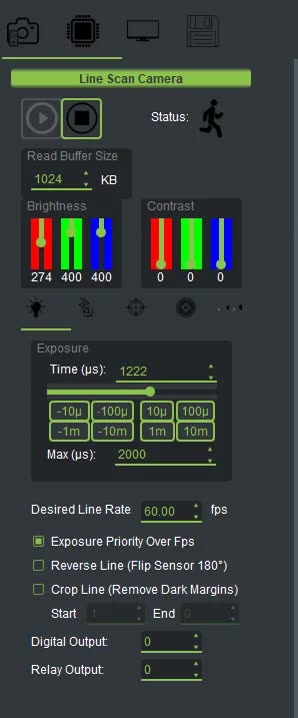
Select the camera node and go to the Exposure tab in the right-hand panel:
This checkbox is on by default. In this mode the exposure is left untouched and the line rate drops instead. When it is off, the line rate is maintained and the exposure is shortened.
The Desired value is only your request. See the actual rate in the Diagnostics tab of the left column, in the Line Rate row. If this number is lower than the requested rate, there are two possible reasons: either the exposure does not fit into the interval of each line, or another part of the system is lagging behind.
- Open the Line Scope chart and keep Auto Scale to Content off so that the scale stays fixed.
- Set the exposure time so the peaks don't touch the top of the plot, but also don't fall below half its height.
- Match Desired Line Rate to the conveyor speed. If the image is stretched in the direction of motion, the line rate is too high and you should lower it. If it is compressed, raise the rate.
- In the Diagnostics tab, compare the Line Rate value with the requested rate.
- If these two values differ, decide whether exposure or rate takes priority. Then set the Exposure Priority Over Fps checkbox to match that decision.
- They compensate for a dark image with gain (Contrast), not with exposure or light. But gain amplifies the noise along with the signal.
- Leaving exposure priority on for a moving line, then wondering why the part dimensions in the image come out wrong.
The area-scan camera has the same checkbox, with the same logic applied to the frame rate (Desired Frame Rate). The only difference is that there, a drop in rate results in fewer frames per second, not a distorted image.
You can find a more general explanation of exposure in imaging on Wikipedia (English).
Models and specifications line scan cameras can be found on their own page. If you need help reaching the right rate and exposure on your own line, send us the conveyor speed and part dimensions via contact form.