
Article
Noise reduction in ALTRON: line and frame averaging and noise filters
In Noise reduction Nothing is free. Every method reduces noise and takes something in return: either line rate, fine detail, or fast response to motion. In this article we compare ALTRON’s tools from exactly this angle, to make clear which cost is acceptable for your production line.
Before any filter
If the image is dark, first fix the lighting and exposure. No filter can recover a signal that was never captured. Most tools in this article are averaging methods and follow one simple rule: random noise decreases with the square root of the number of samples. Averaging four samples halves the noise, and averaging a hundred samples reduces it to one tenth.
ALTRON’s main averaging tool is the Smoothing node. It is already included in the ready-made monochrome line-scan camera graphs. In other graphs, add it in the graph editor. Inside this node there are three stages, each of which you turn on separately. The execution order is always fixed: Bundle Average, then Box Car and then Continuous Average.
It averages every N consecutive lines and outputs one line. The output line rate becomes N times lower. When the camera is faster than you need, instead of throwing away the extra lines you use them to reduce noise.
Keep the geometry in mind. If the output becomes four times slower, the camera’s line rate must rise by the same factor. Otherwise the image is compressed in the direction of motion.
It works along the line itself. Each pixel is averaged with N neighbors on each side. Because the information comes from adjacent pixels and not from time, it does not create trails on moving objects either. The cost is that edges and details become softer along the line. Keep N small.
Each output line or frame is the average of the last N lines or frames. The rate stays constant and the noise goes down. In return, anything that moves leaves a trail N lines or frames long behind it. It is excellent for static scenes and laboratory measurements. On a moving belt, either turn it off or set N very small.
- Line-scan camera with spare line rate: Bundle Average.
- Still scene or lab sample: Continuous Average.
- Moving object, fine detail less important: Box Car with a small N.
- You want details to show but not grain: the DDE node, described below.
The DDE-Digital Detail Enhancement node works on line-scan and area-scan cameras, and its panel opens with the title SNR + DDE. It splits the image into a base layer and a detail layer. It reduces noise in the detail layer and slightly boosts real details.
Changes in this panel are not applied until you press Set.
Thermal cameras only: The TNR-Temporal Noise Reduction node is for monochrome area-scan camera images and is mostly used for thermal images. It blends each frame with the previous filtered frame. Parameter a is the weight of the new frame: a smaller value gives less noise but creates trails behind moving objects.
- Turn on the stages one at a time.
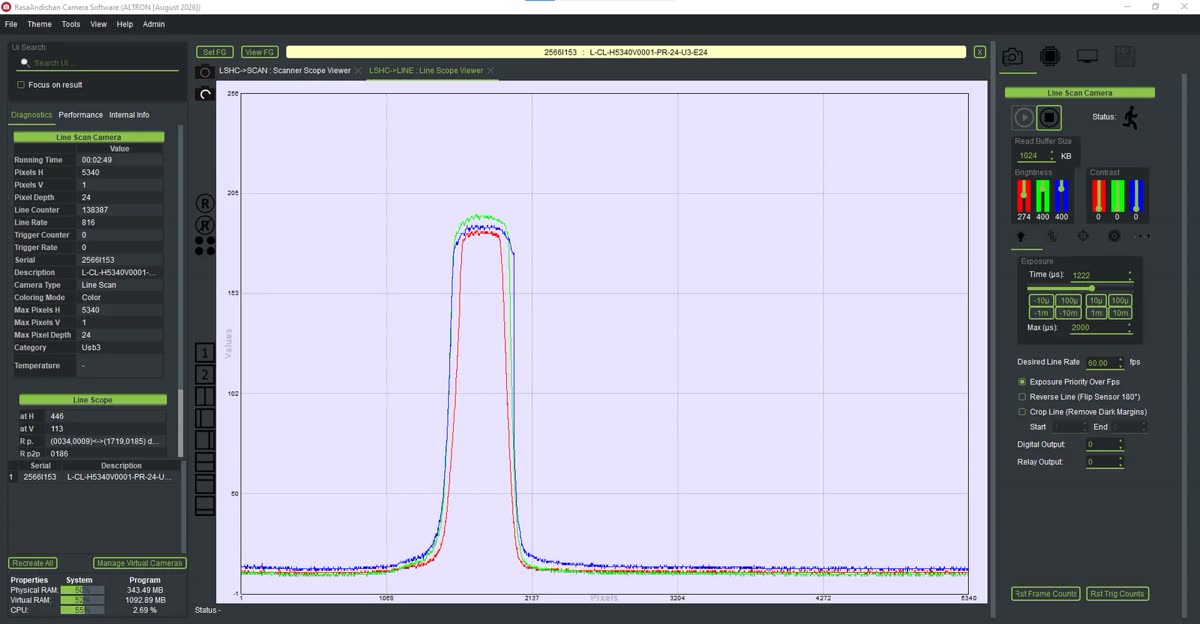
- After each one, look at the Line Scope plot or the image.
- Start from the lowest value and go up only until the noise becomes acceptable.
When two or three filters are on together and the image has gone bad, it is no longer clear which one ate the details. A common mistake is also to set Continuous Average with a large N on a moving belt and then wonder why the edges are blurred in the direction of motion.
To learn more about image noise, see Wikipedia article (English).
You can find the cameras these tools work with on the line scan cameras and area scan cameras page. If you are not sure which method suits your production line better, get in touch with us.